
S-MAS Sprint
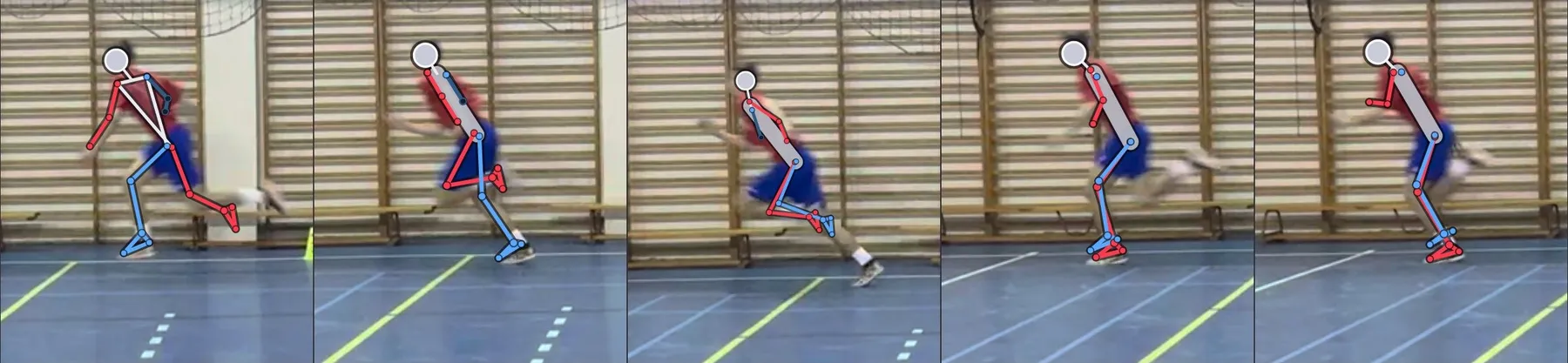
You film the sprint from the side, the app helps you find the five key frames of the step cycle, and you score the twelve items of the S-MAS scale. A score with its interpretation, a kinogram and a correction plan — usually in a few minutes per athlete.
sprint.oleksysport.com
- Free, no account
- Videos never leave the phone
- 12 languages
- AI skeleton (MediaPipe)
- Kinogram and PDF report
- History and retests
About the tool
Scientific basis
Bramah C. et al., Sprint Mechanics Assessment Score, American Journal of Sports Medicine 2024. Inter-rater ICC 0.828, intra-rater 0.799, measurement error about 1 point. The S-MAS Sprint app is an independent OleksySport tool — it is not affiliated with the authors of the scale and is not a medical device.
Step-by-step guide
A full assessment has six stages. The first two happen on the pitch or in the hall (about 35 minutes including the warm-up), the other four in the app (about 15 minutes per athlete, less once you get the hang of it). All examples come from one real recording: indoor hall, iPhone, 120 frames per second, flying sprint.
Phone with slow motion
Notesat least 120 fps, ideally 240 fps; charged, with free storage (1 min of 1080p/240 slow-mo ≈ 0.5–0.7 GB)
Tripod with a phone mount
Notesstable, lens at about 0.8 m, camera level enabled
Measuring tape 20–50 m
Notesto measure the run-up, the filming zone and the camera distance
Cones (at least 5)
Notesstart, 30 m, 40 m and two calibration cones 2.00 m apart on the lane
Timing gates (optional)
Notesa flying 10 m time makes choosing the trial easier
| Equipment | Notes |
|---|---|
| Phone with slow motion | at least 120 fps, ideally 240 fps; charged, with free storage (1 min of 1080p/240 slow-mo ≈ 0.5–0.7 GB) |
| Tripod with a phone mount | stable, lens at about 0.8 m, camera level enabled |
| Measuring tape 20–50 m | to measure the run-up, the filming zone and the camera distance |
| Cones (at least 5) | start, 30 m, 40 m and two calibration cones 2.00 m apart on the lane |
| Timing gates (optional) | a flying 10 m time makes choosing the trial easier |
Step 1 · 10 min
Set-up and camera
The set-up decides whether the footage can be scored at all. Set it once, measure it, write the dimensions down and repeat it exactly at every retest — only then are you comparing the athlete rather than the camera position.
Run-up
Value25–30 m
Whythe athlete must reach maximal velocity before the filming zone (20–25 m is enough for youth players)
Filming zone
Value30–40 m
Why10 m marked with cones — you score flying sprinting, not the start
Camera position
Valuelevel with 35 m
Whylens axis perpendicular to the lane, exactly at the middle of the zone
Distance from the lane
Value7 m
Whythe athlete fills about 1/3 of the frame height, 1–2 full steps in view
Lens height
Valueabout 0.8 m
Whyat hip height — the least angle distortion
Calibration cones
Value2.00 m apart
Whyon the lane, in the middle of the frame — used to calibrate the scale
Background
Valueas calm as possible
Whyno people; wall bars, nets and cables make tracking harder
Parameter Value Why Run-up 25–30 m the athlete must reach maximal velocity before the filming zone (20–25 m is enough for youth players) Filming zone 30–40 m 10 m marked with cones — you score flying sprinting, not the start Camera position level with 35 m lens axis perpendicular to the lane, exactly at the middle of the zone Distance from the lane 7 m the athlete fills about 1/3 of the frame height, 1–2 full steps in view Lens height about 0.8 m at hip height — the least angle distortion Calibration cones 2.00 m apart on the lane, in the middle of the frame — used to calibrate the scale Background as calm as possible no people; wall bars, nets and cables make tracking harder - Level: floor and wall lines in the frame are horizontal (turn on the grid and level in the camera app).
- The camera stays still during the whole trial — no panning, no zooming. The app does the zooming.
- The whole body stays in frame at every step, from the top of the head to the feet.
Do a test pass at a jog and watch it straight away — 30 seconds that can save the whole session.
Step 2 · 25 min
Warm-up and filming
Sprint mechanics depend on the warm-up, fatigue and motivation. A warm-up that is always the same matters more than a "perfect" one.
General warm-up
Time8 min
Contentjogging, arm circles, hip and ankle mobility
Technical drills
Time6 min
ContentA-skip, B-skip, wall drill, 10 m skips
Strides
Time3 × 40 m
Contentprogressively 70 / 80 / 90% speed, walk back
Test trials
Time3 × flying
Contentmaximal, standing start, 3–4 min rest
Block Time Content General warm-up 8 min jogging, arm circles, hip and ankle mobility Technical drills 6 min A-skip, B-skip, wall drill, 10 m skips Strides 3 × 40 m progressively 70 / 80 / 90% speed, walk back Test trials 3 × flying maximal, standing start, 3–4 min rest Slow motion
Value120–240 fps
Notesat 60 fps ground contact (~100 ms) is only 6 frames and the swinging foot is blurred
Resolution
Value1080p
Notesenough for scoring; 4K only makes the scan slower
Format
Value"Most Compatible" (H.264)
Notesopens in every browser; HEVC is reliable only in Safari
Focus and exposure
Valuelocked (AE/AF)
Notespress and hold on the cone in the middle of the zone
Airplane mode
Valueon
Notesa notification will not interrupt the recording
Phone setting Value Notes Slow motion 120–240 fps at 60 fps ground contact (~100 ms) is only 6 frames and the swinging foot is blurred Resolution 1080p enough for scoring; 4K only makes the scan slower Format "Most Compatible" (H.264) opens in every browser; HEVC is reliable only in Safari Focus and exposure locked (AE/AF) press and hold on the cone in the middle of the zone Airplane mode on a notification will not interrupt the recording - Analyse the trial with the best flying 10 m time or — without timing — a typical trial with no stumble. Pick the rule once and stick to it.
- You score the leg closer to the camera. Score the other side from trials run in the opposite direction (the camera stays put).
- After each trial note the file name, the time and the athlete's comments (pain, RPE).
Step 3 · 3 min
The app: athlete, video, scale, scan
Open sprint.oleksysport.com in the browser on a phone or computer. The analysis view is a six-step wizard — you cannot move on until the previous step is complete. Videos and scores stay on the device.
- Athlete: "Athletes" tab → "+ Add". First name and initial, birth year, position and height. Always enter the height — it calibrates the image without extra measurements.
- Step 1 · Video: load the file from the gallery. The "Frame rate" field must show the RECORDING frame rate (120 or 240), not the playback rate. Tick the protocol conditions and set the running direction.
- Step 2 · Athlete and scale: choose the athlete and the calibration — "Athlete height" or "Two points" (tap both cones and enter 2.00 m). Without a scale you still get times and the score, but not step length or speed.
- Step 3 · AI scan: set the A–B range to one cycle (from toe-off to the next ground contact of the same foot), then "AI: range → phases". With a busy background use "Athlete box".
AI suggests — it does not score. The scan proposes five phase markers and computes contact, flight and step times. You confirm every marker by hand and score every item yourself.
Step 4 · 3 min
Five phases of the step
S-MAS does not score "the whole run" but five specific frames of one cycle. The most common source of disagreement between raters is not a different opinion about mechanics — it is different frames.
CTO · contralateral toe-off
The frame you are looking forthe last frame in which the stance foot still touches the ground
Items1
MVP · maximal vertical projection
The frame you are looking forthe pelvis at its highest point in flight (mid-flight)
Items2, 3
LSW · late swing
The frame you are looking formaximal knee extension in swing, just before contact
Items4, 5
TD · touch-down
The frame you are looking forthe first frame in which the foot touches the ground
Items6–11
MST · midstance
The frame you are looking forthe pelvis directly above the ankle of the stance leg
Items12
Phase The frame you are looking for Items CTO · contralateral toe-off the last frame in which the stance foot still touches the ground 1 MVP · maximal vertical projection the pelvis at its highest point in flight (mid-flight) 2, 3 LSW · late swing maximal knee extension in swing, just before contact 4, 5 TD · touch-down the first frame in which the foot touches the ground 6–11 MST · midstance the pelvis directly above the ankle of the stance leg 12 - Tap a marker, check frames −2…+2 with the −1/+1 buttons and confirm the right one.
- Watch the whole cycle at 0.1× or 0.25× — the order must be CTO → MVP → LSW → TD → MST.
- If no frame fits perfectly, pick the one closest to the definition and add a note.
Step 5 · 5 min
Scoring the twelve items
Score each item in the frame of its phase, not from your impression of the whole run: 0 — sound mechanics, 1 — the feature is present. The total runs from 0 to 12 — lower is better.
0–2
Interpretationvery good mechanics
Typical decisionmaintain, retest every 8–12 weeks
3–4
Interpretationgood — minor remarks
Typical decision1–2 priorities in the warm-up and drills
5–7
Interpretationmoderate — elements to correct
Typical decision4–6 week corrective block, retest
8–12
Interpretationsuboptimal — correction is a priority
Typical decisioncorrection + look for causes (strength, mobility, control), consultation
Score Interpretation Typical decision 0–2 very good mechanics maintain, retest every 8–12 weeks 3–4 good — minor remarks 1–2 priorities in the warm-up and drills 5–7 moderate — elements to correct 4–6 week corrective block, retest 8–12 suboptimal — correction is a priority correction + look for causes (strength, mobility, control), consultation The measurement error of the scale is about 1 point. A one-point difference between assessments sits within the noise — a change of 2 points or more is the signal to act on.
- Score "blind", without looking at the athlete's previous result.
- Now and then re-score the same video after 48 h or hand it to a colleague. A difference above 1 point usually means different phase frames.
Step 6 · 5 min
Report, correction plan and retest
The assessment ends with a report and a plan. The athlete and the coach need a picture, one number with its interpretation and a short list of what to do next.
Kinogram
What it doesputs the five phase frames together with the score under each panel; "Save image" gives you a file to send
Correction plan
What it doesshows only the items scored 1: the cause, a verbal cue and an exercise; "Copy plan" pastes the text into a message
Saving the score
What it does"Finish & save assessment" opens the report with a "Print / PDF" button
History
What it doesscore chart, item map (which features keep coming back) and a side-by-side of two kinograms
Data backup
What it does"Athletes" → "Export JSON" after every session — the data lives only on that device
Feature What it does Kinogram puts the five phase frames together with the score under each panel; "Save image" gives you a file to send Correction plan shows only the items scored 1: the cause, a verbal cue and an exercise; "Copy plan" pastes the text into a message Saving the score "Finish & save assessment" opens the report with a "Print / PDF" button History score chart, item map (which features keep coming back) and a side-by-side of two kinograms Data backup "Athletes" → "Export JSON" after every session — the data lives only on that device - Put at most 1–3 priorities in the report, most important first — not every 1 at once. Start with items linked to ground contact and load acceptance (7, 9, 10, 12), then swing (2, 4, 5) and trunk (3, 6).
- Retest after 4–6 weeks of corrective work, under identical conditions: venue, camera, run-up, warm-up, footwear, trial-selection rule.
Frequently asked questions
Does the app cost anything?+
No. S-MAS Sprint is free, with no account and no limit on analyses.
Do athletes' videos go online?+
No. The whole analysis, AI skeleton included, runs in the browser on your device. Athletes and scores are stored in that browser's storage — which is why an "Export JSON" after each session is a good habit.
What phone do I need?+
Any phone with 120 fps slow motion (240 fps is better) and Safari or Chrome. You can add the app to the home screen — it then works like a regular app, offline too after the first scan.
The video will not load — what now?+
Usually it is HEVC outside Safari. Set the camera format to "Most Compatible" or open the file in Safari on the iPhone.
Contact times look too long.+
Step 1 has the playback frame rate instead of the recording one. For a 240 fps recording the "Frame rate" field must show 240.
The scan cannot find the athlete or "swaps" the legs.+
The athlete is too small in the frame or the background is busy. Use "Athlete box" and a shorter A–B range (one cycle). Swapped legs in the skeleton do not affect scoring — you score the image, not the skeleton; correct the phase markers by hand.
My data has disappeared.+
iOS clears data of websites not used for a few days. Add the app to the home screen and export JSON after every session.
Is an S-MAS score a diagnosis?+
No. S-MAS is a screening and training tool. A higher score is associated with mechanics typical of hamstring overload, but decisions about load and return to play are made by a specialist looking at the whole athlete.
The tool supports a specialist's assessment and does not replace a clinical examination.
Would you rather we did it for you?
We run the assessment, the analysis and the plan for an athlete or a whole team — on site or remotely.